How it works
Four steps to a real morning
Thrise removes the snooze button and puts a small physical mission in its place. By the time it’s quiet, you’re already up.
- No snooze button
- Rings through Silent & Focus
- Works offline
Step 1 · Set it
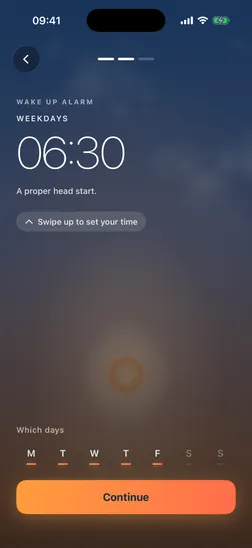
Set your alarm by dragging the sunrise
Open Thrise to a living, real-time sky. Drag the sun up or down to set your wake time in 5-minute steps, pick your days, and choose a wake-up mission.
- Living sky
- 5-minute steps
- Pick your mission
Step 2 · It rings
A loud alarm — through Silent mode and Focus
Thrise wakes you with the same power as Apple’s own Clock — loud enough for the heaviest sleeper, right on your Lock Screen. There’s no snooze button to reach for.
- Silent
- Focus
- Do Not Disturb
- No snooze
Step 3 · Earn it
Complete the mission to switch it off
To silence the alarm you complete the mission — for example, camera-counted push-ups. Thrise verifies every rep on your iPhone. It can’t be skipped: you move to switch it off.
- Verified on-device
- No skip

Step 4 · Bank the win
Grow your streak and morning art
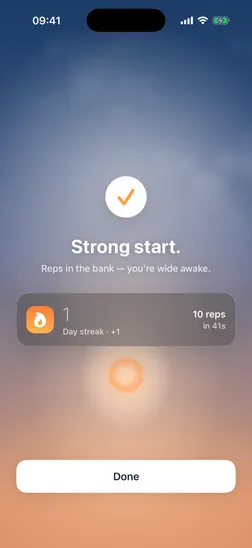
Finish and Thrise celebrates. Your day streak grows, and the morning is saved to a private gallery of generative art. It’s motivation, not punishment — getting up should feel like a win.
- Day streak
- Morning-art gallery
Built so it can’t quietly fail
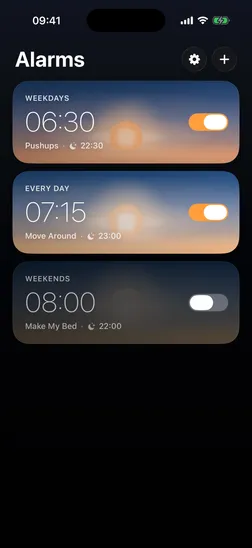
A wake-up alarm is only as good as its reliability. Thrise chains backup alarms behind your main one, so a single missed tap never lets you sleep in — and the alarm that’s ringing is never disturbed by edits to your other alarms. If alarm permission is ever off, an unmissable banner warns you before it costs you a morning.
Good to know
All questionsWhat happens if I don’t finish the mission?
The alarm keeps ringing. Thrise chains backup alarms behind your main one, so it won’t quietly give up — you silence it only by completing the mission. If you stall, it re-rings until you’re up.
What if the room is dark or the camera can’t see me?
For camera missions, Thrise prompts you to step back and turn on a light so it can see you clearly. If that isn’t practical, choose a mission that doesn’t use the camera — like Motion — so a dark bedroom is never a blocker.
Does it need Wi-Fi or an internet connection?
No. Thrise works fully offline. Your alarms, missions, and streaks all run on your iPhone — no account and no connection required.
Can I change the mission, or use one without the camera?
Yes. You can switch your wake-up mission anytime, and pick one that needs no camera — such as Motion, which uses your phone’s motion sensors. Camera missions like push-ups are optional.
How does it ring if my phone is on Silent or in Focus?
Thrise has the same system-level wake-up power as Apple’s own Clock, so it rings through Silent mode, Focus, and Do Not Disturb, and appears on your Lock Screen — a muted phone won’t stop it.