Features
Everything in your no-snooze alarm
A loud, no-snooze mission alarm for heavy sleepers — with five wake-up missions, a gentle sunrise, an evening wind-down, streaks, and a keepsake of every morning. All offline, all on your iPhone.
Wake-up missions
Five ways to earn your morning
Silence the alarm by completing a mission — verified on your iPhone, so you can’t fake it from bed. Pick the one that fits your morning.
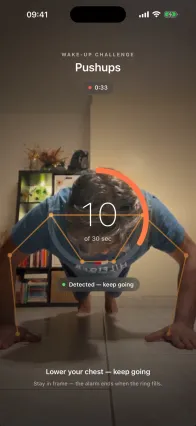
Push-ups
Camera-counted reps — a workout alarm you can’t fake from bed.
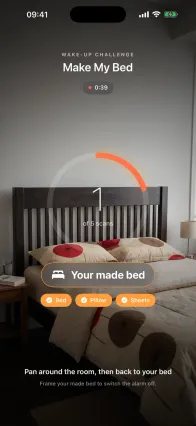
Make my bed
Photo-confirm a made bed to switch the alarm off.
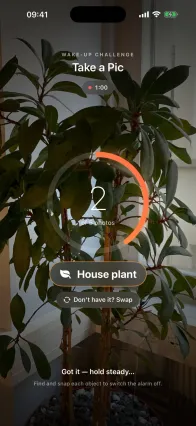
Take a pic
Find and snap a target object to prove you’re up.
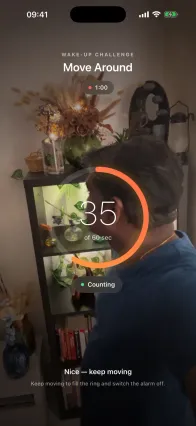
Move around
Walk for about a minute to shake off deep sleep.
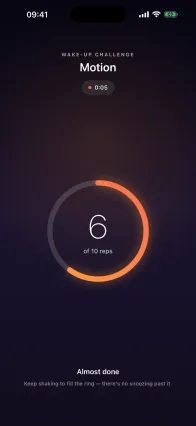
Motion
Move and shake your phone through the prompts — a motion-sensor mission with no camera.
Loud & unmissable
A muted phone won’t save you
The same wake-up power as Apple’s own Clock — loud enough for the heaviest sleeper.
- Cuts through Silent mode, Focus & Do Not Disturb
- Loud enough for the deepest, heaviest sleeper
- A calm, Weather-style list of your alarms
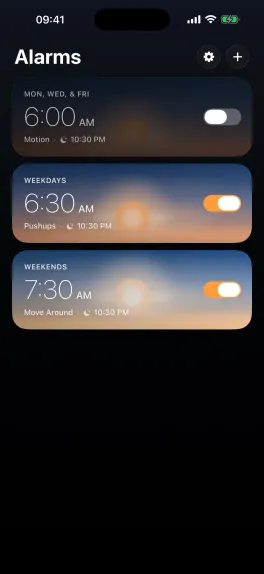
Calm by design
Wake to a sunrise, not a buzzer
A living sunrise and ambient sound make waking gentle — even when the alarm is loud.
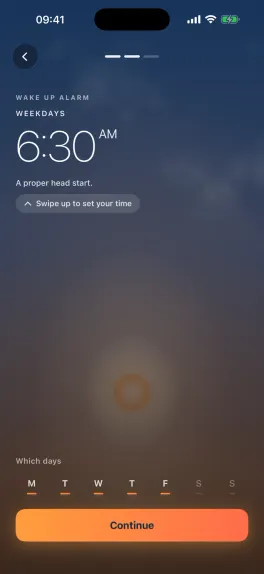
- Set your time by dragging the sun
- A living sunrise that moves with the light
- Dawn Chorus, Rainfall & Ocean soundscapes
The full toolbox
Everything else that makes the habit stick — before bed and after you’re up.
Backup-alarm reliability
Chained backup alarms mean a single missed tap never lets you quietly sleep in.
Multiple alarms
Keep a Weather-style list of alarms, each with its own days, mission, and sound.
Evening wind-down + reminder
Guided breathing or stretches, plus a bedtime reminder at your set time that nudges you toward sleep.
Streaks
A day streak and best streak that grow every morning you show up.
Keepsake “Your Mornings” gallery
Dawn-creature art and morning snaps, grouped by day, replayable as a time-lapse montage.
Works offline, no account
No sign-up, no cloud. Everything runs on your iPhone, even in airplane mode.
Your photos never leave your iPhone
No account, no cloud. Thrise works fully offline and camera missions are processed on-device — never uploaded. Swiss-made.
- Works offline
- ·
- No sign-up or tracking
- ·
- On-device only

Feature questions
All questions Does Thrise have a sunrise or light alarm?
Yes. Every alarm opens on a living sunrise you set by dragging the sun, so you wake to gradually building light before the sound — a gentle sunrise wake-up, backed by a loud alarm you can’t sleep through.
Can I set multiple alarms?
Yes. Thrise keeps a Weather-style list of alarms, each with its own days, wake-up mission, and evening wind-down.
Does Thrise have calming sounds or soundscapes?
Yes. Ambient soundscapes — Dawn Chorus, Rainfall, and Ocean — play while you complete your wake-up mission and during your wind-down, instead of a jarring buzzer.
Is there an evening wind-down or bedtime reminder?
Yes. Thrise offers a guided breathing or gentle-stretch wind-down, plus a bedtime reminder — a notification at your set time that nudges you toward sleep.
Does Thrise save my mornings or keep a gallery?
Yes. Every wake-up is saved to a keepsake “Your Mornings” gallery — generative dawn-creature art and morning snaps, grouped by day and replayable as a time-lapse. It’s stored on your iPhone only.